
Shah Alam Trade-Counter Displays: QR Sign Size, Placement and Testing
A busy trade counter in Shah Alam needs a sign that answers the customer’s next question without slowing down payment or collection. A QR code may lead to a catalogue, quotation form or collection instructions, but it is useless when poorly placed or hard to scan. This article treats countertop printing as part of the customer journey, from the visible call to action to physical proof testing and campaign maintenance.

Choose one useful destination for the QR code
Before designing the card, define what the scan should open and who maintains that destination. A WhatsApp quotation, current price list or collection guide can be helpful when clearly labelled. Avoid sending customers to an unmaintained homepage without context. A QR code should reduce work for staff rather than simply demonstrate that the business has a code.
For the purchase approval, open the destination on a phone without being logged into the business account. This is worth recording before the design is signed off, because a broken link or inaccessible form makes a polished sign actively frustrating.
Place the sign along the customer’s path
Stand where a customer approaches the counter and observe where attention naturally falls. A sign next to the payment machine may be noticed while people wait, but it must not obstruct the scanner, cash handling or product pickup. A front edge display may face visitors better than one placed behind the computer.
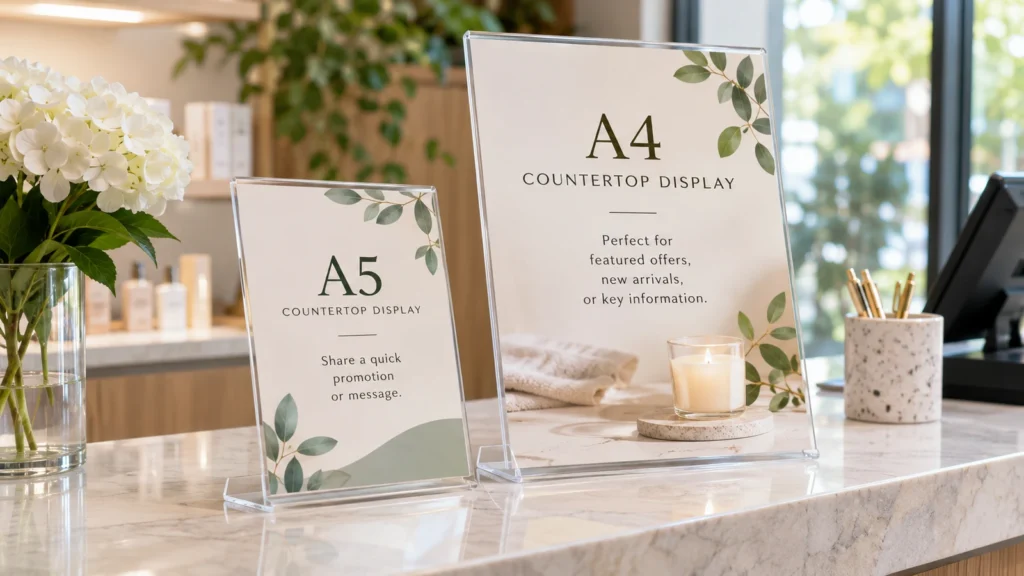
A useful verification step is to mock up an A5 and an A4 card in the available holder positions. The practical reason for that check is that a taller sign can block staff sightlines and still be ignored by the customer.
Give the QR enough clear space
A code needs adequate printed size, contrast and uninterrupted quiet area. Patterned backgrounds, gloss reflections and folded card edges can interfere. Do not position the code so low that products or customers’ hands cover it. If the layout includes a short web address as a backup, ensure it can be typed comfortably.
During the production review, scan actual-size physical proofs with different phones at realistic distances. Skipping this step can cause a surprisingly expensive problem: a code tested only as a large image on screen may fail after shrinking for print.
Write a headline that explains the benefit
A customer should understand why scanning is worthwhile. “View uniform catalogue” or “Request quotation” gives more direction than a vague “Scan me”. Include short instructions only when the process is not self-explanatory. If a promotion is involved, its current conditions and any qualification need accurate wording. The sign’s role is to guide, not overwhelm.
The team should also ask first-time visitors what action they expect before they scan. Treat this as part of the specification rather than an informal preference, since a generic QR icon without a purpose may be skipped even when technically readable.
Choose stock for spills and frequent cleaning
Counter displays may contact damp cloths, bags, elbows and direct light. Consider a replaceable printed insert inside a sturdy holder or a mounted piece for longer-term use. Compare matte and gloss under the same shop lighting. Confirm whether the selected print and lamination can tolerate the actual cleaning method; do not assume every stock is waterproof.
Before a supplier prepares the final proof, wipe a sample using the normal counter-cleaning procedure and check its edges. The risk is operational as much as visual: a printed insert that curls quickly may create repeated replacement work.
Control revisions across counters
If a QR destination changes, verify the code again rather than assuming a link will remain stable. Record the final file name, print dimensions, destination URL, install date and the staff member authorised to replace it. Businesses with multiple collection points should also track where each sign is placed.
For a repeat order, assign one owner to review sign destinations and withdraw obsolete versions. Keep the result with the approved sample, since old counter cards can keep directing customers to discontinued promotions or forms.
Practical example: making the decision
A Shah Alam building-supply counter wants visitors to scan a digital catalogue rather than ask staff for printed price sheets. The first QR card is placed behind an acrylic shield and beside a payment display. Customers cannot reach it comfortably, and reflections disrupt scanning on some phones. The team tests two card positions using a paper mockup, chooses a clearer customer-facing spot and adds a short benefit-led headline. It also prints a simple backup address and assigns one person to monitor the landing page. The resulting counter sign includes a revision date and holder specification, so old versions can be removed when the catalogue changes. It demonstrates that digital convenience still depends on a physical display that people can see, reach and trust.
Additional approval considerations
A trade-counter display can serve different customers at different times. Contractors collecting orders may want a status link, while walk-in visitors may need a product catalogue. If both actions are genuinely important, use a clear choice or separate cards rather than one ambiguous QR symbol. Test the flow with staff who are not involved in designing the campaign.
Analytics, if used, should be interpreted sensibly: a scan count alone does not prove a sale or successful enquiry. The more useful measures may be how often people reach the correct page and whether staff answer fewer repetitive questions. Set a simple review date rather than changing signage every time traffic fluctuates.
- Open the destination on a phone without being logged into the business account.
- Mock up an A5 and an A4 card in the available holder positions.
- Scan actual-size physical proofs with different phones at realistic distances.
- Ask first-time visitors what action they expect before they scan.
- Wipe a sample using the normal counter-cleaning procedure and check its edges.
- Assign one owner to review sign destinations and withdraw obsolete versions.
An additional control is to open the destination on a phone without being logged into the business account. Combine that check with a final handover step: assign one owner to review sign destinations and withdraw obsolete versions. Keep both results with the dated approval sample so a replacement order uses the same reference. Where the material, delivery address or production technique changes, ask for a fresh confirmation rather than assuming that an old quotation covers the new combination.
Frequently asked questions
Is A5 large enough for a QR counter card?
Often, if code size, viewing distance and holder position are tested.
Can the QR link be changed later?
That depends on whether a managed redirect or fixed destination was used.
Should the sign have a backup URL?
It can help when customers cannot scan, provided the address is short and maintained.
Can SelangorPrint arrange collection?
Its site mentions Shah Alam and Klang collection options; confirm the relevant order details.
For a quotation based on the actual garment, print method, quantity and delivery location, review SelangorPrint services and use the official enquiry page. Prices, methods, production schedules and minimum quantities must be confirmed for the specific job.